
Let's Learn 11ty Part 10: Bringing It All Together
04 Aug 2022
#eleventy
#webdev
#tutorial
#ssg
In our last article we used external data to render posts on our site.
If you noticed, we don’t have that cool Previous/Next Post that was at the bottom of our posts before.
Wouldn’t it be nice to have that back? That is the main focus of this article.
Let’s first look at what our post pagination looked like before with local posts
{% set previousPost = collections.post | getPreviousCollectionItem(page) %} {%
set nextPost = collections.post | getNextCollectionItem(page) %} {% if
previousPost %}Previous:
<a href="{{ previousPost.url }}">{{ previousPost.data.title }}</a>{% endif %}
<br />
{% if nextPost %}Next:
<a href="{{ nextPost.url }}">{{ nextPost.data.title }}</a>{% endif %}
Above, we were making use of what I called one of the cornerstones of Eleventy - collections.
This method will not work for the posts we’ve fetched from Hashnode because they aren’t part of a collection like the posts we had.
To bring that functionality back we will need to add a couple things to our eleventy.config.js
The Old Way
When I first did this, I made a collection to make a collection to get the previous and next post, as well as a filter. That, I have since learnt is not necessary.
For reference that looked like this:
// The collection
eleventyConfig.addCollection("articles", async () => {
  const endpoint = `https://api.hashnode.com/`;
  const { GraphQLClient, gql } = require("graphql-request");

  const client = new GraphQLClient(endpoint);

  const query = gql`
    {
      user(username: "Psypher1") {
        publication {
          posts {
            title
            coverImage
            brief
            slug
            dateAdded
            contentMarkdown
          }
        }
      }
    }
  `;

  const articles = await client.request(query);

  return articles.user.publication.posts;
});
// The Filter
elevntyConfig.addFilter("nextArticle", (articles, page, modifier = 1) => {
  const parts = page.outputPath.split("/");
  parts.pop(); // get rid of `index.html`
  const slug = parts.pop();
  for (const [index, article] of articles.entries()) {
    const target = index + modifier;
    if (article.slug === slug && target >= 0 && target < articles.length) {
      return articles[target];
    }
  }
});
What We Do Now
We can take advantage of the pagination object as it gives us what we already need. What we will do is add this to postLayout.njk
<nav class="flex justify-between mt-8">
  {% if pagination.previousPageHref %}
  <a href="{{ pagination.previousPageHref }}">← Previous</a>
  {% endif %} {% if pagination.nextPageHref %}
  <a href="{{ pagination.nextPageHref }}">Next →</a>
  {% endif %}
</nav>
What we then have is this:
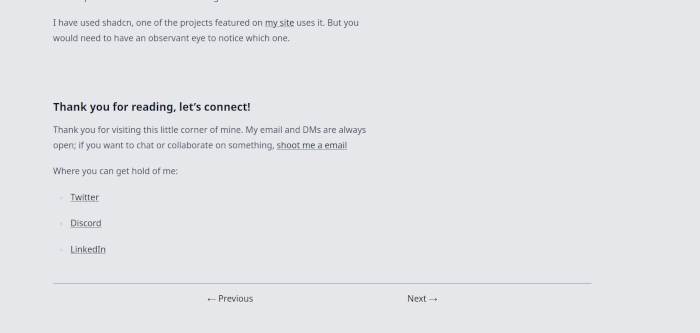
You will notice that things look styled a bit more nicee. I added the typography plugin. It’s not that hard to add.
Paginate On Blog Home
Right now our articles are a long scrolling list. Wouldn’t it be nice to have a limited number of post and then we can go next page?
Let’s do that.
We’ll update blog.njk frontmatter to this:
---
layout: base
title: Blog
tags: page
order: 3
pagination:
  data: posts
  size: 7
  alias: pagedPosts
permalink: "/blog/{% if pagination.pageNumber > 0 %}page/{{ pagination.pageNumber }}/{% endif %}"
---
We’ll then upated the loop to use pagedPosts
{% for post in pagedPosts %}
<li class="blog-list-item shadow-lg bg-white p-4">
  <a
    href="/blog/{{ post.slug }}/"
    class="block font-semibold text-lg hover:text-cyan-800 blog-link"
  >
    {{ post.title }}
  </a>
  <small class="blog-date">{{ post.published_at | pubDate }}</small>
</li>
{% endfor %}
Then a navigation at the bottom
<nav class="flex justify-between mt-8">
  {% if pagination.previousPageHref %}
  <a href="{{ pagination.previousPageHref }}">← Newer</a>
  {% endif %} {% if pagination.nextPageHref %}
  <a href="{{ pagination.nextPageHref }}">Older →</a>
  {% endif %}
</nav>
That then give us:
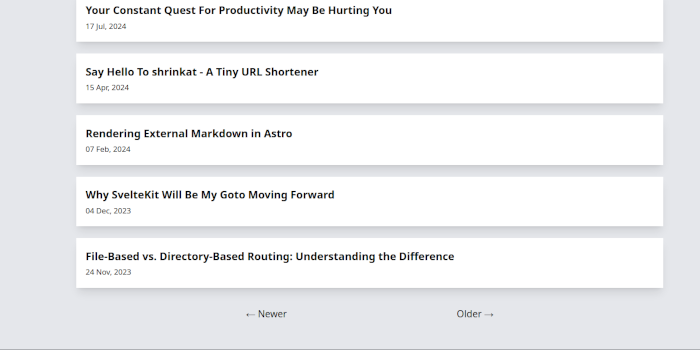
I think we are in a good place. Repo and articles updated. Now it is to you to see where you can take this.
Special thanks goes to Shiv Jha-Mathur from the Eleventy Discord who provided the guidance and solution for the initial implementation.
My Quest For You
Now that we’ve seen how we can fetch articles from an API and still have the same functionality we had with local ones. Try to see how you can combine everyhing we’ve learnt in the series into one complete site.
In the meantime, I will work on updating the series repo - do the different branches per part thing.
Wish me luck 😄
Thank you for reading, let’s connect!
Thank you for visiting this little corner of mine. My email and DMs are always open; if you want to chat or collaborate on something, shoot me a email
Where you can get hold of me: